Self-hosting a font with Tailwind (JIT) and SvelteKit

Edit 24-May-2022: I've updated this post and it can be found at https://jeffpohlmeyer.com/self-hosting-a-font-with-tailwind-and-sveltekit
In the vein of learning in public, I want to write a little blurb about this.
A project I'm working on for a client required the use of a font called Univers Black. Since I was showing it to him using a combination Poppins and Nunito, my kneejerk reaction was to check https://fonts.google.com to see if I could get the quick @import statement, only to find that it's not actually available on Google fonts. So after a quick search I was directed to https://www.fontsplace.com/univers-black-free-font-download.html where it provided me a univers-black.tff file.
I did some searching online and found resources https://itnext.io/create-unique-websites-with-custom-tailwind-css-fonts-d28db832261d and https://stackoverflow.com/questions/60854215/tailwind-use-font-from-local-files-globally, but neither of them worked for me. So it was on to the next: YouTube. A quick search took me to https://www.youtube.com/watch?v=sOnBG2wUm1s (after watching the video I immediately subscribed to the channel because the video is just so well explained I know there's bound to be a lot of good content there).
Long story short, you want to do two things:
- Update your main
*.cssfile (where you have the big 3 Tailwind directives) to add this custom font family to the base layer
/* app.css */

@tailwind base;
@tailwind components;
@tailwind utilities;
- Update the
tailwind.config.jsfile to assign this font to a class The fairly straightforward way to update the*.cssfile is as follows
/* app.css */

@tailwind base;
@tailwind components;
@tailwind utilities;

@layer base {
    @font-face {
        font-family: 'Univers';
        src: local('Univers'),
           url('/static/fonts/univers-black.ttf') format('ttf');
    }
}
As a note, I have all of the images I'm hosting in the static directory instead of the public directory.
Then I just need to update the config file:
// tailwind.config.js

const config = {
    mode: 'jit',
    purge: ['./src/**/*.html', './src/**/*.js', './src/**/*.svelte'],
    theme: {
        extend: {
            fontFamily: {
                univers: ['Univers'],
            },
        }
    }
}
Then anywhere I want to apply it I simply apply the font-univers class. Should be great, right? Well, to test this I created a simple Svelte component
<div class="h-screen grid place-items-center">
  <h1 class="font-univers text-7xl">Testing Univers Font</h1>
</div>
and the resulting image is what I saw
 Frustrating to say the least. After a half hour of pulling my hair out, moving the files to a newly created
 public folder, using an @import with a local url path, and any number of other things, I tried on other option. I went to https://cloudconvert.com/ttf-to-woff and converted the .ttf file to .woff and .woff2 files. Upon doing this, I updated the app.css file to look like
/* app.css */

@tailwind base;
@tailwind components;
@tailwind utilities;

@layer base {
    @font-face {
        font-family: 'Univers';
        src: local('Univers'), url('/static/fonts/Univers-Black.woff') format('woff'),
            url('/static/fonts/Univers-Black.woff2') format('woff');
    }
}
and almost like magic this is what I saw
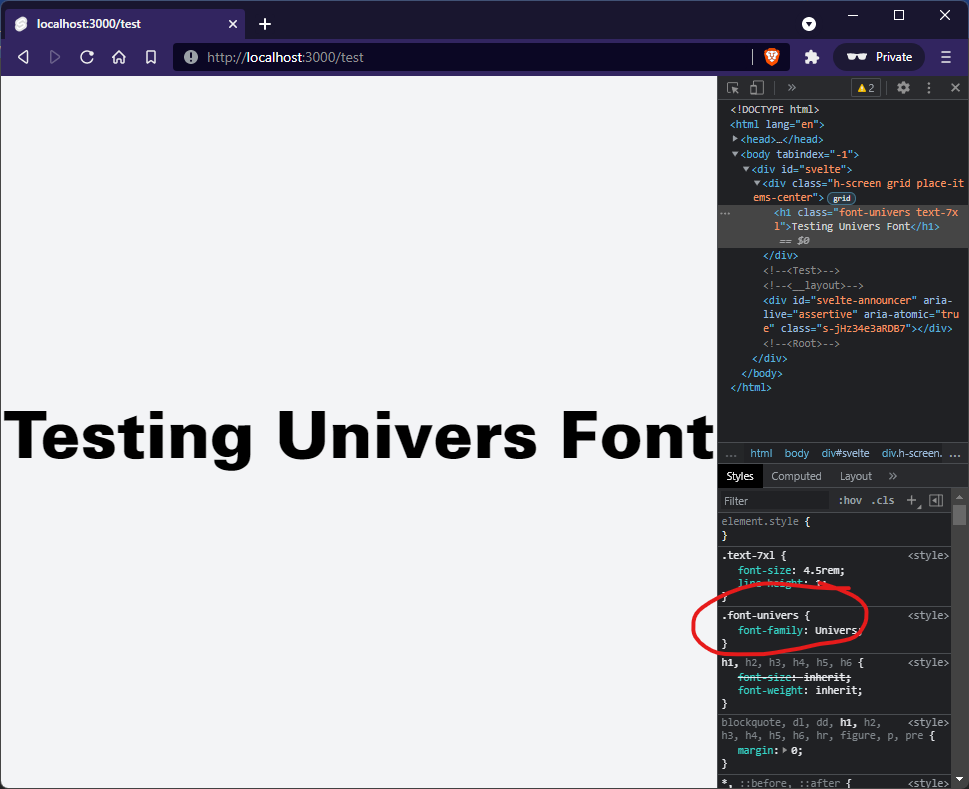
So, it seems that, when using Tailwind with the JIT compiler in a SvelteKit app, that it just doesn't like .tff files and you're better off using .woff and .woff2 files for self-hosted fonts.


